NMEA Switch Control
Bristol Maps can control relay switches on NMEA 2000 devices such as the Yacht Devices YDNR-02N relay module. This allows you to control onboard electronics directly from the app.
Overview
The NMEA Switch Control page provides:
- Connection status – Visual indicator showing whether the relay device is connected
- Last update time – When the device status was last refreshed
- Individual switch controls – Toggle each relay on or off
- Timer controls – Set auto-off timers for each relay
- Temperature probes – View readings from connected temperature sensors
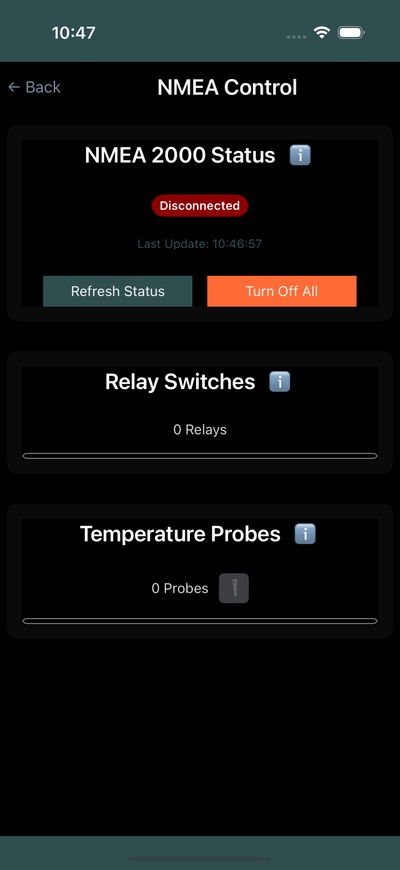
Relay Switches
Each relay switch shows:
| Element | Description |
|---|---|
| Name | User-configurable label (tap to rename) |
| Status | On (green) or Off (red) indicator |
| Relay # | Hardware relay number |
| Toggle | Switch to turn the relay on or off |
| Timer | Set an auto-off timer |
Using Timers
The timer feature lets you automatically turn off a relay after a set period:
- Tap the timer button on a relay
- Set the duration
- The relay will automatically turn off when the timer expires
The remaining time is displayed below the switch.
Turn Off All
The Turn Off All button deactivates all relay switches at once.
Temperature Probes
If temperature probes are connected to your NMEA 2000 network, readings are displayed with:
- Probe ID and instance number
- Current temperature reading (Celsius)
- Timestamp of the reading
You can clear historical temperature data using the delete button.
Hardware Setup
Network Required
The relay device must be accessible on your local network. Ensure your device is connected to the same network as the NMEA 2000 gateway.
Compatible hardware includes:
- Yacht Devices YDNR-02N – 4-port relay module
- Other NMEA 2000 relay devices supporting the standard protocol
Connection is configured through NMEA Settings using the device IP address and port.