Boundaries & Alarms
Bristol Maps displays fishing district boundary lines and provides a proximity alarm system to help you stay aware of regulatory lines while fishing.
Boundary Lines
Fishing district boundary lines can be loaded and displayed on the navigation page. These correspond to Alaska Department of Fish and Game (ADF&G) fishing district boundaries.
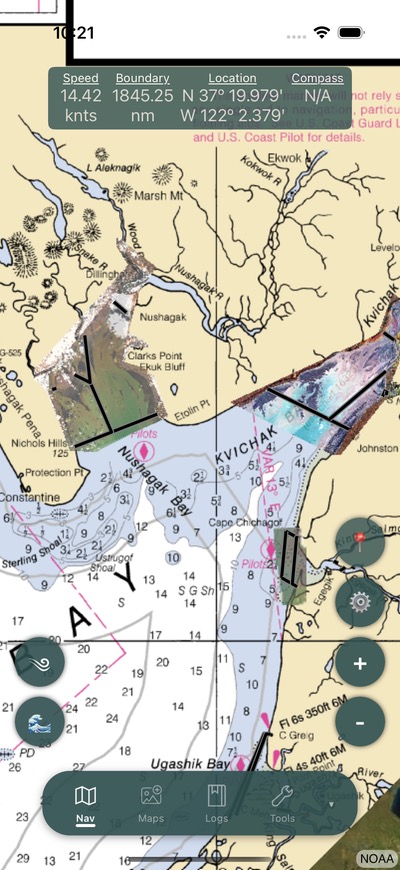
Loading Boundaries
- Open the navigation settings menu
- Select Boundary Lines
- Browse available boundaries by district
- Toggle individual boundary lines on or off
Boundaries can be searched and filtered by name or district.
Custom Boundaries
You can create your own custom boundary lines:
- Open the boundary list
- Select the add button
- Define your boundary by placing points on the map
- Save with a name and optional description
Custom boundaries work with the same alarm system as the built-in district lines.
Boundary Alarm
The boundary alarm system alerts you when you approach a loaded boundary line.
Setting Up the Alarm
- Open the navigation settings menu
- Enable Boundary Alarm
- Set the alarm distance – how far from the boundary you want to be alerted
How It Works
- The navigation banner displays your distance to the nearest boundary in real time
- As you approach, the distance display transitions from miles to feet when you get close
- When you reach the alarm distance, an audio alert sounds
Warning
The boundary alarm requires GPS to be active and boundary lines to be loaded on the map. Ensure your boundaries are toggled on for the alarm to function.
Audio Alarm
The audio alarm can be toggled on or off independently of the proximity display. Even with the audio disabled, the distance display will still show on the navigation banner.
Configuration
All boundary alarm settings can be adjusted in Settings:
| Setting | Description |
|---|---|
| Line Alarm | Enable or disable the boundary alarm |
| Alarm Distance | Distance threshold for triggering the alarm |
| Audio Alarm | Toggle the audible alert on/off |