AIS Vessel Tracking
Bristol Maps can display AIS (Automatic Identification System) vessel positions on the navigation page, giving you real-time awareness of nearby vessel traffic.
Where the included AIS data covers
The AIS data included with your subscription is a seasonal service provided in requested areas – not blanket coverage everywhere.
It currently covers Bristol Bay, and Prince William Sound in part.
Outside those areas, or outside the season, expect few or no targets from the included feed. You can still see AIS anywhere you fish by connecting your own receiver – see AIS via NMEA below.
What is AIS?
AIS is a maritime tracking system used on ships and by vessel traffic services. AIS transponders broadcast vessel information including:
- Position (latitude/longitude)
- Speed and heading
- Vessel name and MMSI number
- Vessel type and dimensions
Bristol Maps displays AIS targets from two independent sources:
| Source | Coverage |
|---|---|
| Included AIS data | Seasonal, and only in requested areas – currently Bristol Bay and part of Prince William Sound |
| Your own AIS receiver | Anywhere you are, within the range of your hardware. See AIS via NMEA |
Enabling AIS
AIS vessel targets can be enabled from the navigation settings. When enabled, nearby vessels broadcasting AIS will appear on the map as labeled icons showing their name, speed, and heading.
If you turn AIS on and see nothing, check where you are against the coverage above before assuming a fault – an empty map outside a covered area or outside the season is expected behaviour, not a problem.
AIS Filter
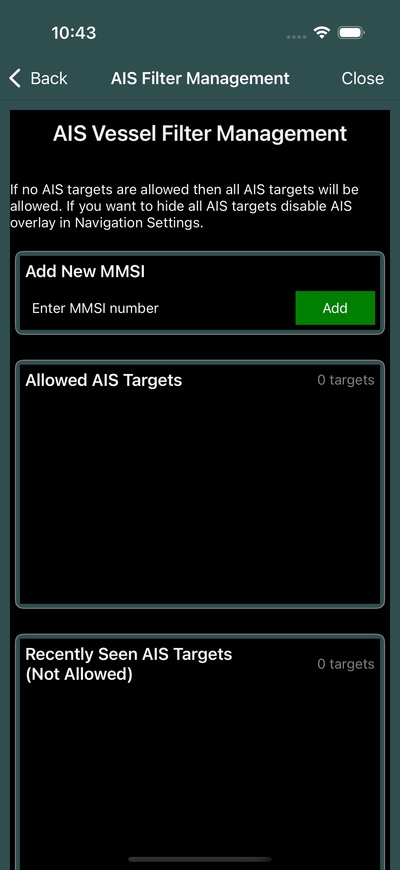
The AIS filter allows you to control which vessels are displayed:
- Open the AIS filter from the navigation settings
- Add specific MMSI numbers to an allowed list
- Only vessels matching your filter will be displayed
This helps reduce clutter on the map by showing only the vessels you care about, such as your fleet members or specific tenders.
Tip
If you have an MMSI number for a specific vessel you want to track, add it to your filter list to see only that vessel’s position.
AIS via NMEA
If you have an AIS receiver connected via NMEA, Bristol Maps displays targets from your own hardware in addition to the included AIS data.
This is the way to get AIS outside the covered areas or outside the season: your receiver picks up any vessel in range wherever you are, and does not depend on the included feed or on having a data connection.
The AIS Sharing toggle in NMEA Settings allows you to share AIS data received from your local hardware with your fleet group.
AIS Target Display
AIS targets appear on the map with:
- Vessel name label
- Speed indicator
- Heading direction
- Position updated in real-time